Expressvpn Glossary
Campus area network
What is a campus area network?
A campus area network (CAN) connects multiple buildings within a limited geographical area, such as a university campus, hospital complex, or corporate headquarters. It links several local area networks (LANs) under the control of one organization.
A CAN is larger than a single-building LAN but smaller than a metropolitan area network (MAN), which spans a city.
How does a campus area network work?
A CAN uses a layered design to keep traffic organized and secure. Each building has its own internal network, and all buildings connect to a central backbone. The structure typically includes:
- Core layer: The central high-speed layer, often built with fiber connections. It moves large volumes of data between buildings.
- Distribution layer: Switches in each building aggregate traffic from local devices and connect to the core backbone.
- Access layer: Switches that connect end-user devices such as computers, printers, phones, and Wi-Fi access points.
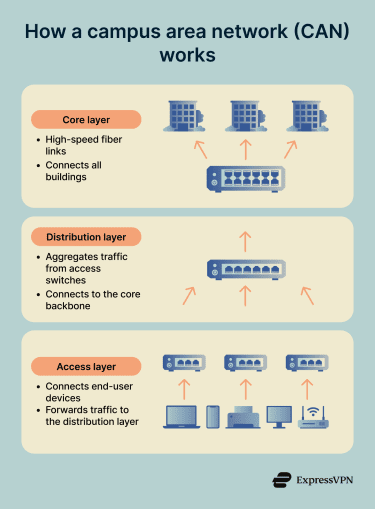
Traffic flows from user devices to access switches, then to distribution switches, and finally across the core backbone to reach other buildings or centralized services.
Why is a campus area network important?
The main advantages of CANs include:
- Enables shared services across campus: Servers, databases, authentication systems, and internal applications can be hosted centrally and accessed from any connected building.
- Simplifies centralized security management: Instead of managing separate networks at each building, campus networks make it easier to maintain consistent protection across the entire organization and simplify compliance reporting and incident response.
- Improves performance compared to public links: Campus networks use dedicated infrastructure with high-speed connections between buildings, which often provide lower latency and more predictable performance than routing traffic over the public internet.
- Reduces operational and connectivity costs: Centralized oversight can reduce duplication of systems and simplify troubleshooting, which may lower operational costs over time.
Where are campus area networks used?
CANs are common in organizations that require consistent connectivity, shared systems, and unified oversight across a defined physical area. Typical use cases include:
- Universities and colleges: Connecting classrooms, dormitories, libraries, and administrative offices.
- Corporate campuses and office parks: Linking multiple buildings under centralized IT oversight.
- Hospitals and medical campuses: Connecting clinical departments, labs, and imaging centers.
- Research institutes: Enabling high-speed data sharing between laboratories.
- Government or military complexes: Maintaining controlled access across operational and administrative facilities.
Risks and privacy concerns
CANs face specific security challenges due to their size and complexity. Common security considerations include:
- Flat networks enable lateral movement: When network segments aren't properly isolated, an attacker may be able to move laterally through the network. Proper segmentation limits this exposure by creating boundaries between different network zones.
- Misconfigured virtual LANs (VLANs): Incorrect VLAN settings can allow unauthorized users to access resources they shouldn't. Regular audits help ensure VLAN configurations match security policies.
- Rogue access points: Unauthorized wireless access points connected to the network can create entry points and may expose traffic to eavesdropping. Monitoring for unexpected network devices helps detect these issues.
- Weak network access control: Without strong network access controls, personal devices or compromised systems can connect to the network and potentially access sensitive data.
- Unpatched switches risk compromise: Network switches running outdated firmware often contain known vulnerabilities. Regular patching schedules keep infrastructure devices protected against documented security issues.
Further reading
- A complete guide to subnetting, VPNs, and network security
- Network topology: Best practices for modern networks
- The 7 pillars of zero-trust security
- What is network discovery? How to enable it safely
- What is a MAC address and why does it matter?