Is Grok safe? What you need to know to stay secure


Grok, the AI chatbot from xAI, is designed to answer questions, provide information, and engage in conversation. But with any AI tool, it’s natural to wonder how safe it is to use.
In this guide, we explore what Grok collects, how the service uses and protects your data, and who may have access to it. We also look at how Grok compares to other AI models and highlight the settings and best practices that help you stay in control of your privacy while using the tool.
What is Grok, and how does it work?
Grok is a large language model (LLM) developed by xAI, an American artificial intelligence company founded by tech entrepreneur Elon Musk in 2023. It generates responses by analyzing the text you provide, comparing it to patterns learned during training, which is the period where the model is exposed to large amounts of text so it can learn language structure, common phrasing, and how information is typically expressed. It then predicts a useful next set of words.
Beyond text, Grok also supports image and video generation, but one feature that sets Grok apart is its connection to public content on X. When enabled, this gives the model access to fast-moving conversations on that platform, allowing it to supplement its training data with what people are discussing right now.
Grok also offers several ways to shape the tone of its responses. In chat, you can choose styles like Custom, Formal, Concise, and Socratic, which adjust how the output is presented without changing how the model works internally.
What data does Grok collect?
When you use Grok, the service collects several types of data to operate and deliver responses. Some of this data comes directly from your interactions with the chatbot. If you choose to link your X account, Grok may also use certain details associated with that account.
Here are the main categories of data involved:
- Account information: If you use Grok through its standalone website or app, xAI collects the basic details needed to create and manage your account, such as your name, contact information, date of birth (required for using certain features of Grok), and account credentials. Payment information may be processed by third-party providers.
- Prompts and uploaded content: Anything you type or upload into Grok may be stored and processed, including sensitive personal information. This includes text, files, images, audio, video, and other content you provide.
- Technical data: Grok automatically receives technical information when you use the service. This can include your IP address, device type, browser details, approximate location, and information about how you interact with the service.
Does Grok share your data?
Yes, Grok may share some of your data, but what it shares depends on where you use the service. If you access Grok on X, the X Privacy Policy applies. If you use Grok through Grok’s website or mobile apps, the xAI Privacy Policy applies.
- X Corp: If you interact with Grok via the X platform, your Grok usage data and certain X account data can be shared between X and xAI to personalize your experience, improve model performance, and support AI development. This includes information like your public profile, engagement, and how you use Grok.
- External service providers: xAI works with cloud hosting partners, analytics tools, payment processors, and safety-monitoring services. These companies may receive your data to store content, support the service, or complete subscription transactions.
- Legal or regulatory authorities: xAI and X may disclose information if required by law. This can include responding to subpoenas or court orders or taking steps to protect users, investigate misuse, or enforce terms of service. This type of disclosure is standard for many online platforms.
- Shared-chat links: If you choose to share a Grok conversation or a generated image or video, anyone with the link can view it. In case you post it publicly, it can also be indexed by search engines, like any publicly available content.
How to control what Grok collects
You can control what data Grok collects by adjusting a few settings in X and in Grok.
Turn off training in X
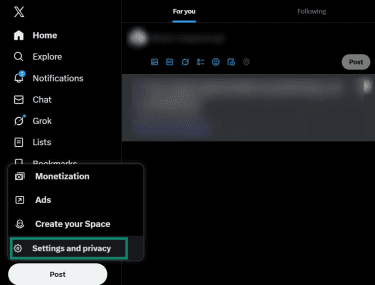
- Open the Settings and privacy menu. On desktop, it’s under the “More” menu, and on mobile, you can find it by tapping your profile picture.
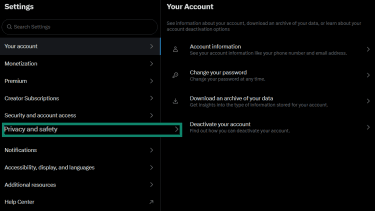
- Select Privacy and safety.
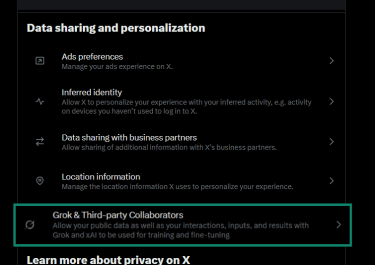
- Open Grok & Third Party Collaborators (you may have to scroll down to find it).
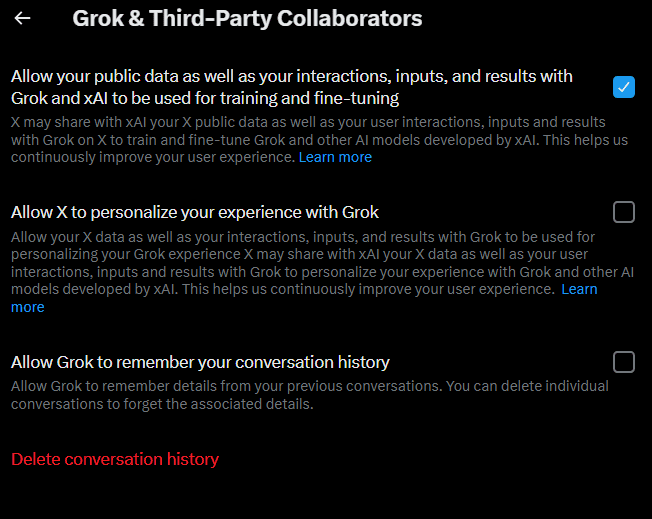
- Turn off the option that allows your posts and Grok interactions to be used for training. While you’re there, you’ll also see controls that let X personalize your experience with Grok and an option that allows Grok to remember your conversation history. These additional options give you more control over how much of your activity is stored or reused.
Change your account visibility
If your X account is public, your posts can appear in the pool of public X content that Grok may draw from. Switching your account to protected limits that visibility. This doesn’t change how Grok processes the prompts you type directly into the chat, but it does reduce how much of your own X activity is available as public data.
- Go back to Settings and privacy.
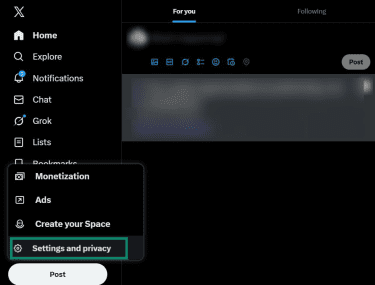
- Select Privacy and safety once more.
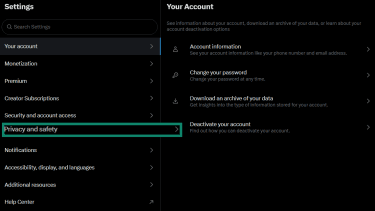
- Click Audience and tagging (listed as Audience, media and tagging on desktop).
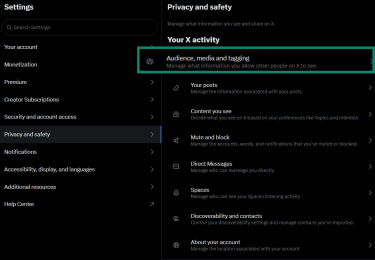
- Turn on Protect your posts. When this option is turned on, only approved followers can view your posts. Also turn on Protect your videos if you want videos you upload to follow the same private-post rules, and adjust Photo tagging based on preference (you can allow anyone, only people you follow, or no one to tag you in photos).
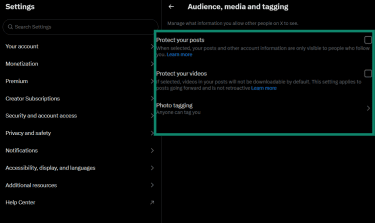
Review Grok’s data controls
- Click your profile picture and select Settings (on mobile, the settings icon is in the bottom-right corner of your conversation history).

- Select Data Controls.
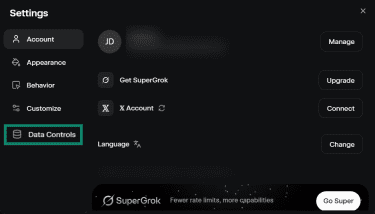
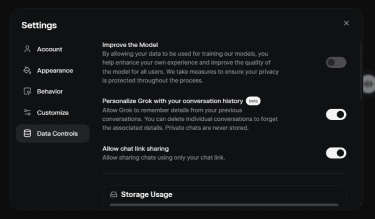
- Review the options under Data Controls. You can disable model training and turn off conversation-history personalization, limit chat link sharing, and regularly review or delete your uploaded files, shared links, and stored conversations. These controls let you manage how much of your information Grok retains and how it can be accessed.
Be selective with what you share
Avoid entering personal or sensitive information into Grok, even when training controls are off. Inputs can still be stored as part of your use of the service.
Be particularly careful not to share:
- Payment details: Credit or debit card numbers, bank information, tax information.
- Government-issued IDs: Social Security or national insurance numbers, passport numbers, or driver’s license details.
- Security credentials: Passwords, authentication codes, API keys, or login tokens.
How to delete Grok history
Grok also allows you to delete individual conversations or clear your entire history. These actions remove the conversations from your interface, but they remain on xAI’s servers for up to 30 days before they’re generally deleted. Keep in mind that xAI may still retain certain data beyond that period as needed for security purposes or to comply with legal obligations.
Keep in mind that deleting a chat doesn’t remove any files you uploaded with the chat. Images and other uploads are stored separately and remain available in Grok’s Files section on desktop, unless you delete them yourself.
Delete individual Grok conversations
To delete individual conversations, open the conversation you want to delete, click the 3 horizontal dots in the top-right corner, click Delete Chat, and confirm your selection when prompted.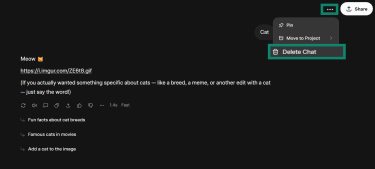
On mobile, simply long-press the conversation you want to delete in your conversation history and tap Delete Conversation.
Delete entire Grok history
- Open the Settings menu by clicking your profile picture and selecting Settings (on mobile, the Settings icon is in the bottom-right corner of your conversation history).
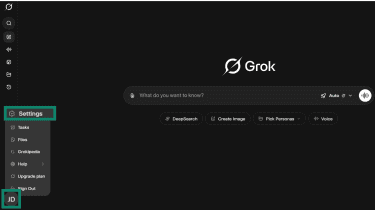
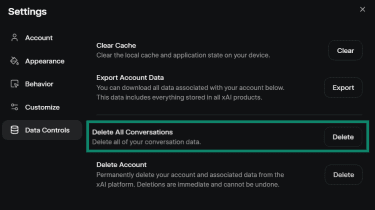
- Select Data Controls and click Delete All Conversations. Confirm your selection.
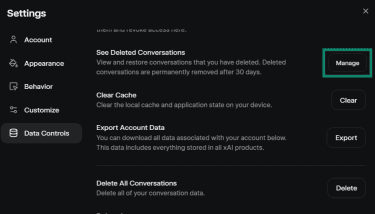
- Go back to the Data Controls menu and open the See Deleted Conversations menu (on mobile this is listed as Recently Deleted in Grok’s main settings menu).
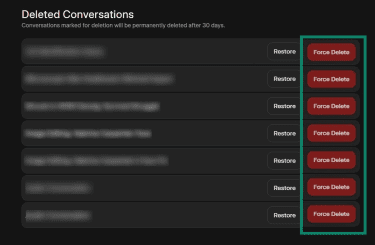
- Click Force Delete on any conversation you want to delete (on mobile, simply tap the conversation you want to delete and tap Delete). You can also restore conversations you’ve deleted by accident here.
Delete uploaded files
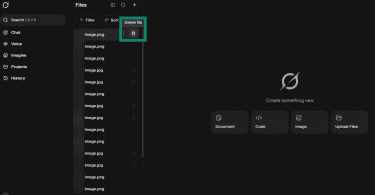
You can only delete uploaded files on the desktop version of Grok. Here’s how:
- Click your profile picture, then tap Files.
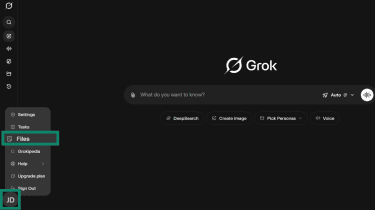
- Hover your mouse over any images or uploads you no longer want stored, and click the Delete icon to remove them.
How secure is Grok?
Grok doesn’t provide a detailed breakdown of its security measures, but xAI states that the service uses technical and organizational safeguards to protect the information you share. For example, stored customer data is protected by encryption in transit and at rest. These measures are meant to reduce misuse, limit unauthorized access, and lower the risk of accidental exposure, although xAI notes that no security system is completely fail-safe.
Internal access to your Grok conversations is restricted to specific roles and situations, for example, engineers addressing a technical problem, trust-and-safety teams reviewing potential policy violations, or staff responding to legal or security requirements. Keeping access limited to these cases helps reduce the risk of unnecessary exposure.
Grok AI vs. other models: How it compares
Grok sits in the same broad category as chatbots like ChatGPT, Gemini, Claude, and Microsoft Copilot, but it approaches conversations a little differently.
Safety comparison: Grok vs. ChatGPT
ChatGPT and Grok both use safety systems that guide how they handle sensitive topics, but the two companies take different approaches to moderation. OpenAI publishes detailed safety documentation and updates its policies frequently, which gives users a clearer view of how the model is designed to behave. These updates also shape how ChatGPT responds to higher-risk prompts, including requests that could involve personal data or harmful activities.
xAI provides fewer public details about its moderation pipeline, and its documentation focuses mainly on how data is processed rather than how individual responses are filtered.
Grok vs. Google Gemini
Gemini builds its real-time answers on top of Google Search, which means it draws from news articles, indexed webpages, and other curated and ranked sources of web information.
Grok does this, too, but it also incorporates public posts from X to reflect what people are discussing at the moment. This allows it to surface emerging topics and fast-changing conversations that haven’t yet appeared in traditional search results.
These two types of sources shape each chatbot’s output, affecting the answers’ tone and stability. Grok tends toward live social context and trends, while Gemini tends toward structured, searchable, and ranked web content.
Grok vs. Microsoft Copilot
Copilot is designed for workplace productivity. It operates inside Microsoft 365 and works with tools such as Word, Excel, Outlook, and Teams, which makes it suitable for drafting content, summarizing information, and using data from apps that employees already rely on.
Microsoft states that Copilot processes prompts within the organization’s existing Microsoft 365 security and compliance framework. For commercial and education tenants, prompts and responses stay inside the Microsoft 365 service boundary and are not used to train the foundation models. This separation allows organizations to use Copilot without exposing internal files, emails, or chats to external model training. Copilot also respects existing permission structures in Microsoft Graph, so it can only surface information a user is already allowed to access.
Grok is more built for general use rather than enterprise workflows, and it doesn’t offer a dedicated environment or separate governance model for organizations that require strict data boundaries. As a result, Grok is suited to everyday conversations, while Copilot is more tailored for businesses that need privacy controls mirroring existing workplace infrastructure.
Should you use a VPN with Grok?
A virtual private network (VPN) can be helpful if you’re concerned about who can see your IP address or your approximate location.
Grok receives basic technical information when you connect, including your IP address and the general region you’re in. That’s common across most online services, but it also means your connection can reveal more about you than you may expect or wish to share.
If you want to limit how much of this background information is visible to xAI/X or to your internet service provider (ISP), a VPN adds a layer of protection by masking your real IP and routing your traffic through a secure, encrypted connection. Just keep in mind that using a VPN doesn’t stop Grok from receiving the information you type or upload, connecting your activity with your Grok account, and it doesn’t change the service’s data-collection policies. In other words, a VPN adds privacy at the network level, but it doesn’t make your chats invisible to the platform itself.
FAQ: Common questions about Grok’s safety
What is Grok AI exactly?
Grok is an AI chatbot developed by xAI, the AI company founded by Elon Musk, and is available within the X platform. Like other large language models (LLMs), it works by analyzing the questions you type and generating responses based on its training data and, in some cases, public posts from X.
Can I opt out of data collection?
You can limit how your posts and Grok activity are used by turning off training in your X settings. Grok still needs your prompts to reply, but switching off training reduces how much of your activity is used to improve the model.
How safe is Grok for teens or students?
Grok can be useful for learning, but students shouldn’t enter personal, sensitive, or any confidential information. Schools and families usually set rules about what can be shared with AI tools, and following those guidelines helps keep interactions safer. Additionally, AI chatbots sometimes produce answers that sound confident even when they’re inaccurate: a phenomenon known as AI hallucinations. Grok is no exception, so its outputs should always be evaluated critically.
Is it safe to use Grok for work purposes?
Grok is fine for general questions, but it’s not a place for internal documents, customer data, or anything confidential. Many workplaces have strict policies on what can be shared with AI tools, so it’s best to check those rules before using Grok or any other AI chatbot for work tasks.
Take the first step to protect yourself online. Try ExpressVPN risk-free.
Get ExpressVPN